
See every account.
Understand every limit.
A good setup is not worth losing a funded account over a daily loss limit. Keep your accounts, drawdown, and remaining loss allowance in view—and check your trade plan before you place it.
Connections & integration roadmap
- cTraderRead-only available
- RithmicTest · review pending
- tastytradeSandbox · testing
- Interactive BrokersReporting feed · setup
- AlpacaApproval pending
- TradovateAccess pending
- MetaTrader 5In research
- TradeLockerPlanned
- Match-TraderIn discussion
 cTrader
Availability varies by provider and account. Roadmap listings do not imply a partnership or authorized access.
Global reach
Around the World Access
One workspace. A world of trading possibilities.
Personal accounts · Funded accounts · One control tower
Financial centers appear as they rotate into view.
Our goal is simple: connect any personal or funded trading account to KR Control Tower, wherever you are in the world.
We are building toward this vision. Connection availability depends on supported integrations, provider authorization, account eligibility, and regional requirements.
Explore our integration roadmapThe problem
One missed limit can cost you an account.
Your balance is on one platform. Your daily loss limit is in another portal. When you trade several accounts, it is easy to miss how close one is to its limit.
Too many tabs
Stop jumping between dashboards just to check which account still has room for another trade.
Different rules
Each firm can have different drawdown, daily reset, position size, news, and payout rules. Keep the limits for each account together.
Preventable mistakes
The setup may look right, but the size may put you past your daily loss limit. Check the account before placing the trade.
Example
Same trade idea. Different outcome.
A funded 50K futures account with $400 of daily loss left. The trader wants to buy NQ with a 12-point stop.
- •Sizes 2 NQ out of habit
- •Risk: 2 × 12 points × $20 = $480
- •A full stop breaks the $400 daily limit and can fail the account
- •Flags that 2 NQ exceeds the remaining daily loss
- •Suggests 1 NQ ($240) or 16 MNQ ($384)
- •The trader decides and places the order on their own platform
Illustrative numbers. NQ = $20 per point, MNQ = $2 per point; fees, slippage and gaps excluded.
See it in action
Real screens, not mock-ups.
Captured from a live workspace with personal details hidden.
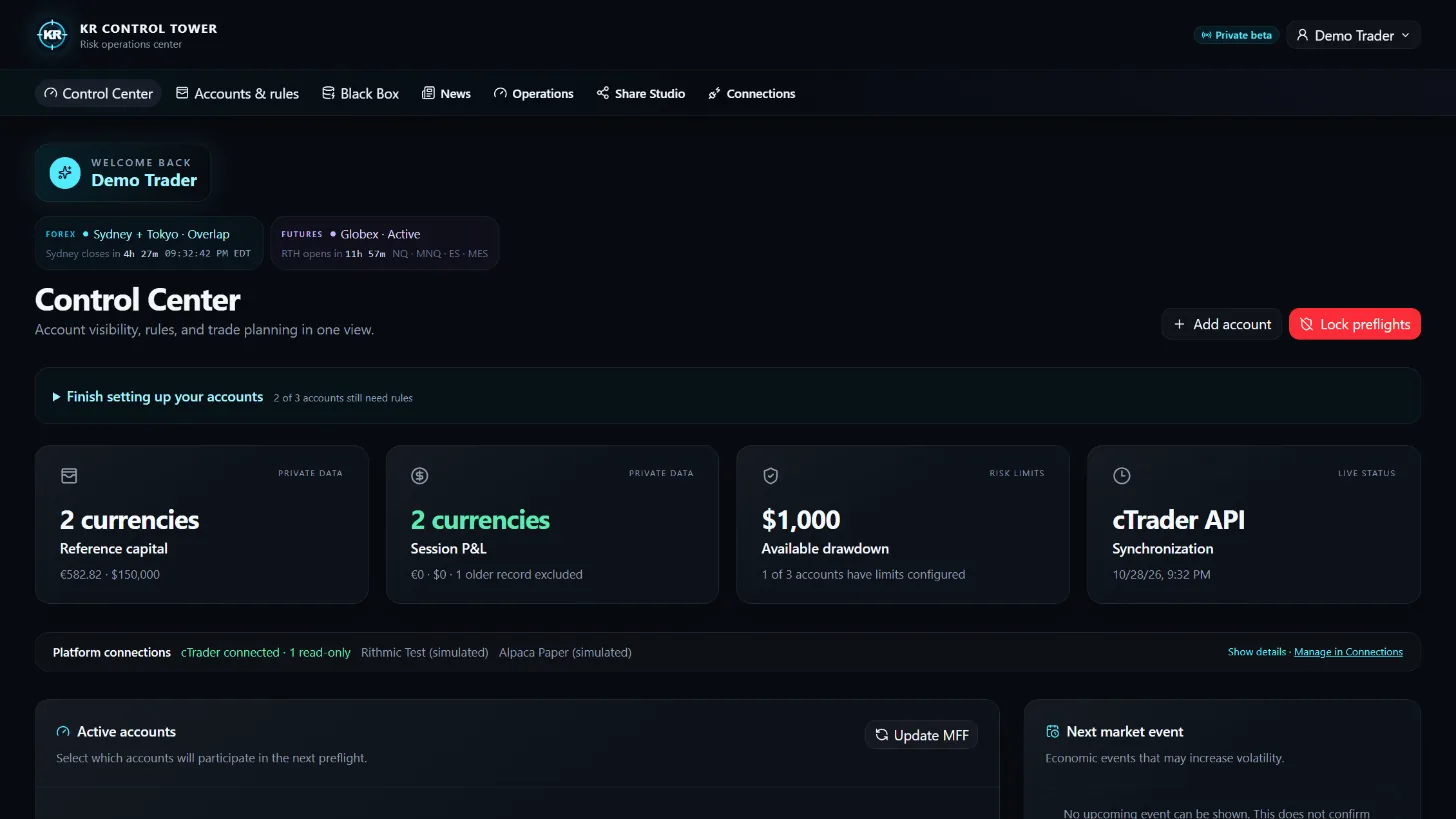
Control Center
Capital, session P&L and limits for every account, separated by currency.
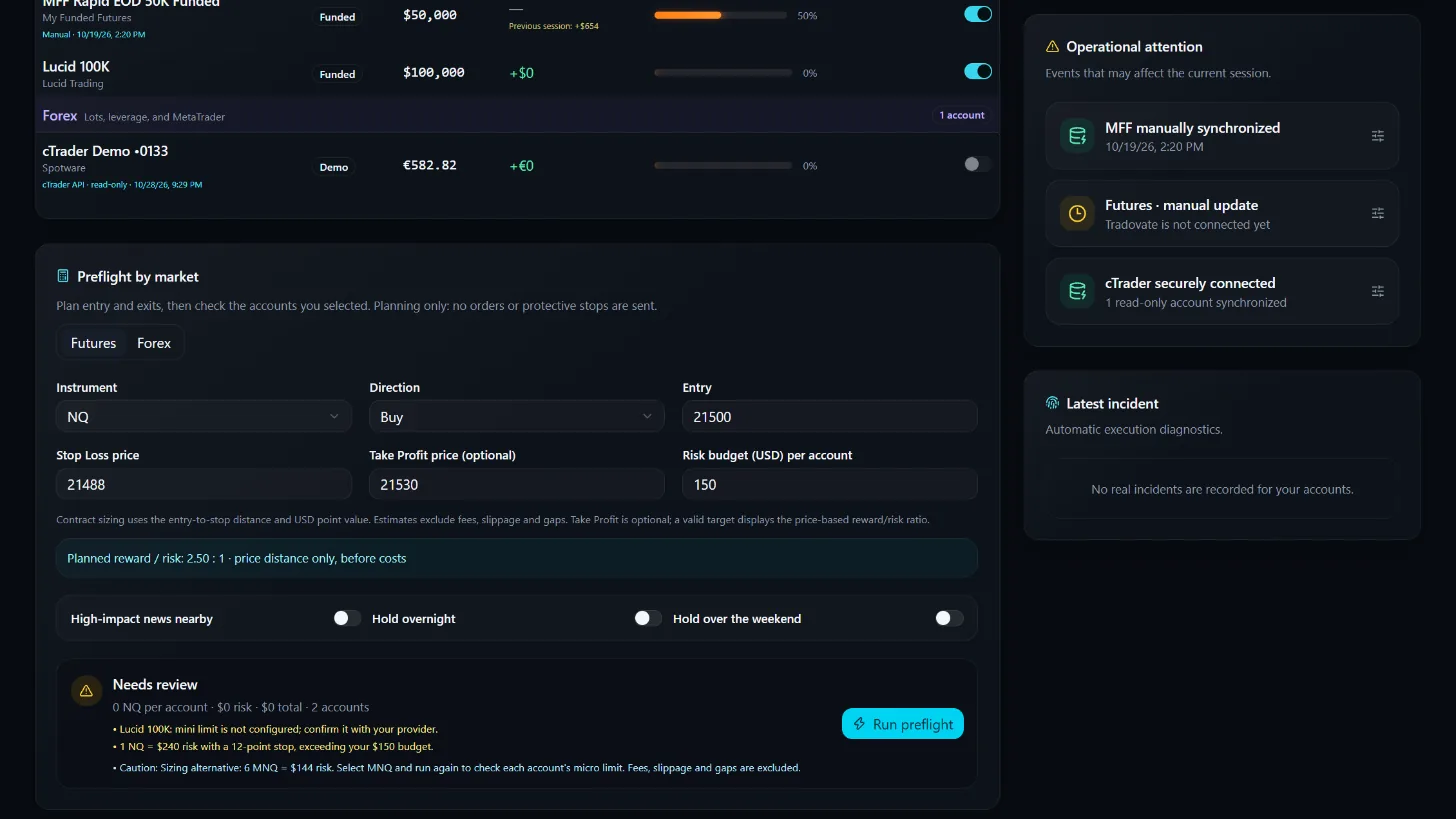
Preflight
A trade plan checked against each selected account before the trader acts.
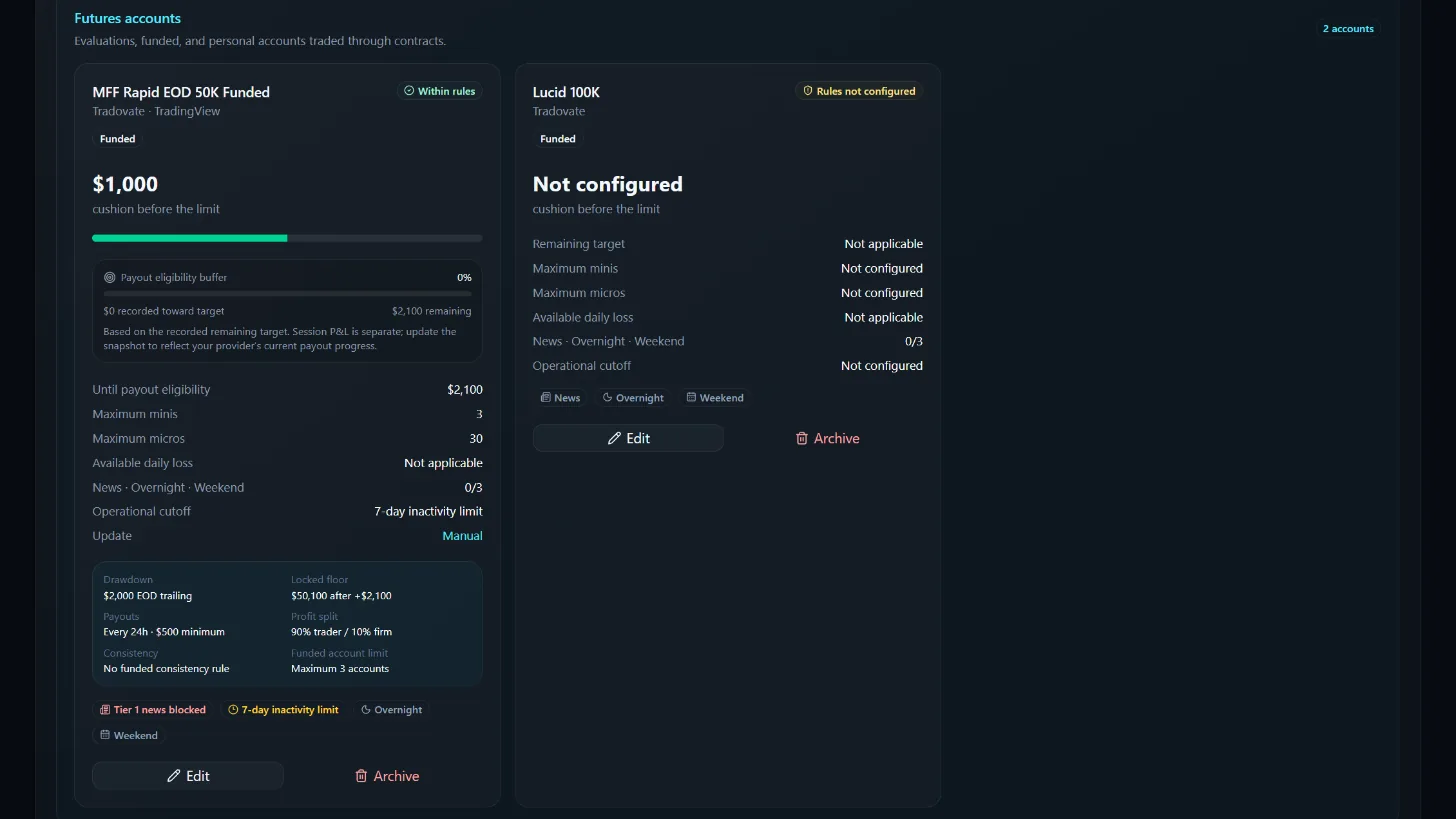
Account rules
Drawdown type, locked floor, payouts, news and inactivity rules in one card.
The product
Your accounts and limits, in one place.
See what you have left before the next trade. Balances, P&L and trades come from your provider; prop-firm rules are set by KR from each firm’s declared rules. Check a plan with Preflight. KR does not place trades or guarantee that you will stay within your firm’s rules.
All your accounts together
Keep personal, evaluation, and funded accounts in one view, with simulated funds separate from real money.
Daily loss and drawdown
See how much loss allowance remains for each account, calculated from the balance your provider shares.
Check your stop and target
Add your entry, stop loss, and optional take profit. Check your plan against selected account limits before placing the trade yourself.
Review your results
Compare balances and session results across your accounts, and see how each account is progressing.
Keep track of the trading day
Check market sessions, important events, and account warnings before you trade.
Review your trade history
See every closed trade from your provider, with win rate, average win and loss, and your best day.
Firm rules
Prop-firm rules, set by KR.
Pick your program and KR applies the rules the firm declares on its official website or directly to KR. Account holders cannot edit them, so they stay accurate.
Program rules were reviewed by KR on 2026-10-22 from each firm’s official source. Firm names identify programs only; no partnership or endorsement is implied.
How it works
Connect. Check your limits. Plan your trade.
Connect the accounts you trade, see the rules that apply to each one, and review your plan before placing an order on your trading platform.
Connect an account
Connect an eligible account through the provider’s official read-only authorization. Check Connections for each provider’s current status.
Rules for each account
Prop-firm accounts use the rules the firm declares, set by KR. Personal accounts use the risk limits you choose.
See how much room remains
View account status, performance, exposure, market context, and remaining risk capacity from one workspace.
Check the next trade
Use account selection and preflight checks to identify conflicts before acting on the connected trading platform.
Security and privacy by design
Private user-scoped data, verified authentication, optional multi-factor protection, encrypted transport, security headers, rate limits, and logged sensitive events form the current security baseline.
A responsible integration model
Our preferred first connection is read-only: account identity, balances, equity, positions, orders, and history through official APIs and explicit user consent. Execution capabilities remain disabled unless separately authorized and tested.
Questions
Frequently asked questions
Does KR Control Tower place trades?+
No. KR shows your accounts, limits and results and checks trade plans. You always place, change and close orders yourself on your trading platform.
Do I have to share my broker or prop-firm password?+
No. Supported platforms connect through the provider’s own read-only authorization, which you can revoke at any time. Accounts are added only through these official connections.
Which platforms connect today?+
cTrader is available with read-only authorization. Other platforms are coming soon; see Connections for each provider’s status.
Does it guarantee I will stay within my firm’s rules?+
No. KR checks your plan against each account’s rules: the firm’s declared rules set by KR for prop-firm accounts, or your own limits for personal accounts. Always confirm current rules and permissions with your provider.
Can I use it for Futures and Forex?+
Yes. Futures accounts (minis and micros) and Forex accounts (lots and leverage) are organized separately, each in its own currency.
How much does it cost?+
Monthly plans start at $39. See the pricing page for what each plan includes.
Built to integrate with permission—not around it.
We welcome technical and compliance review. KR Control Tower can begin with a limited read-only pilot, disclose its data flows and controls, and keep execution unavailable until the provider expressly approves a later phase.
Transparent scope
Current, pilot, and future capabilities are labeled separately.
Controlled authorization
Users connect only their own eligible accounts through approved methods.
Global product direction
Designed for supported markets, providers, entities, and jurisdictions.
Know your daily loss headroom before the next trade.
Connect your accounts, see each account’s rules, and check your plan with Preflight. Every balance comes from your provider.